NextMove

User Research UI/UX Design Prototyping

A student-focused web platform that consolidates post-graduation planning into a single, cohesive experience helping college students navigate job searches, internships, graduate school exploration, and application tracking with clarity and confidence.
Role UX Designer, Researcher
Timeline 12 weeks
Team Academic capstone project
Tools Figma, Miro, RPA
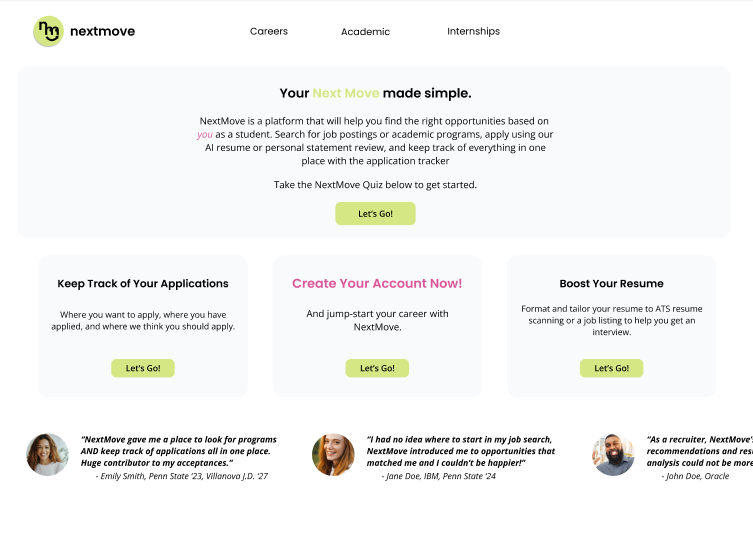
NextMove — Home view
NextMove — Job discovery view
NextMove — Application tracker view

Understanding the Students

The Challenge

Graduating college students face overwhelming confusion when planning their post-graduation paths. They juggle multiple tools such as LinkedIn, Handshake, spreadsheets for tracking, university portals. All of these together are leading to fragmented experiences, missed opportunities, and decision paralysis at a critical life transition.

User Research

I conducted comprehensive research to understand the graduating student experience, using surveys, interviews, and journey mapping to uncover pain points and opportunities.

47 Survey Responses
12 User Interviews
3 User Personas

Key Pain Points

Tool Fragmentation

Students use 5-7 different platforms to manage their post-grad planning, leading to lost information and duplicated effort.

"I have tabs open in three different browsers just to keep track of my applications. It's chaos."

Decision Fatigue

Without clear structure or guidance, students feel paralyzed by the sheer number of options and pathways available.

"I don't even know where to start. Should I apply to jobs? Grad school? Both? I'm just overwhelmed."

Lack of Visibility

Students struggle to see their progress, track deadlines, and understand what steps to take next in their planning journey.

"I wish I could just see everything in one place. what I've applied to, what's due, what I should focus on next."

Defining the Problem

Problem Statement

How might we help graduating college students navigate post-graduation planning in a way that reduces confusion, consolidates fragmented workflows, and provides clear guidance for their next steps?

This problem is critical because students make life-changing decisions during this transition period, yet they lack structured support. The fragmentation across tools creates cognitive overload and leads to missed deadlines, incomplete applications, and decision paralysis. A unified platform could transform this chaotic experience into an organized, confidence-building journey.

Key Insights

01

Fragmentation Creates Friction

Students reported using an average of 6.3 different tools to manage their post-grad planning, with 78% saying they've lost track of applications or deadlines because of this fragmentation.

02

Guidance Over Choice

When presented with unlimited options, 82% of students preferred a guided experience that helps them reflect on goals and narrows down relevant opportunities rather than browsing everything.

03

Progress Visibility Matters

Students expressed high anxiety about not knowing if they're "on track." They wanted visual indicators of progress, upcoming deadlines, and recommended next steps to reduce uncertainty.

04

Deadlines Drive Decisions

Without clear deadline awareness, students defaulted to reacting rather than planning. Seeing deadlines in context helped them prioritise tasks and reduce last-minute panic.

User journey map showing student experience across current fragmented tools

User journey map highlighting friction points in current post-graduation planning process

Exploring Solutions

Ideation Process

I ran a series of ideation sessions using Miro to explore different approaches to solving the fragmentation problem. Key questions included: Should we focus on aggregation (pulling data from existing tools) or creation (building new workflows)? How do we balance structure with flexibility? What features are must-haves vs. nice-to-haves for an MVP?

Ideation session exploring different feature sets and user flows

Core Features Defined

1. Guided Path Quiz

Why: Students needed help narrowing down options before exploring specific opportunities. A reflective quiz helps them identify goals and interests, reducing decision fatigue.

Trade-off: Considered AI-powered recommendations but chose a simpler rule-based approach for MVP to ensure accuracy and control.

2. Unified Application Tracker

Why: The #1 pain point was tracking applications across multiple platforms. A centralized tracker with status updates and deadline reminders addresses this directly.

Trade-off: Initially planned automatic data import from LinkedIn/Handshake but scoped down to manual entry for MVP due to API complexity.

3. Opportunity Discovery

Why: Students wanted to explore jobs, internships, and grad schools in one place rather than switching between platforms.

Trade-off: Built custom search and filtering instead of integrating third-party job boards to maintain consistent UX.

4. Personalized Dashboard

Why: Progress visibility was critical for reducing anxiety. A dashboard showing upcoming deadlines, application status, and recommended actions provides clarity.

Trade-off: Simplified the dashboard metrics for MVP—focused on actionable insights over comprehensive analytics.

Bringing NextMove to Life

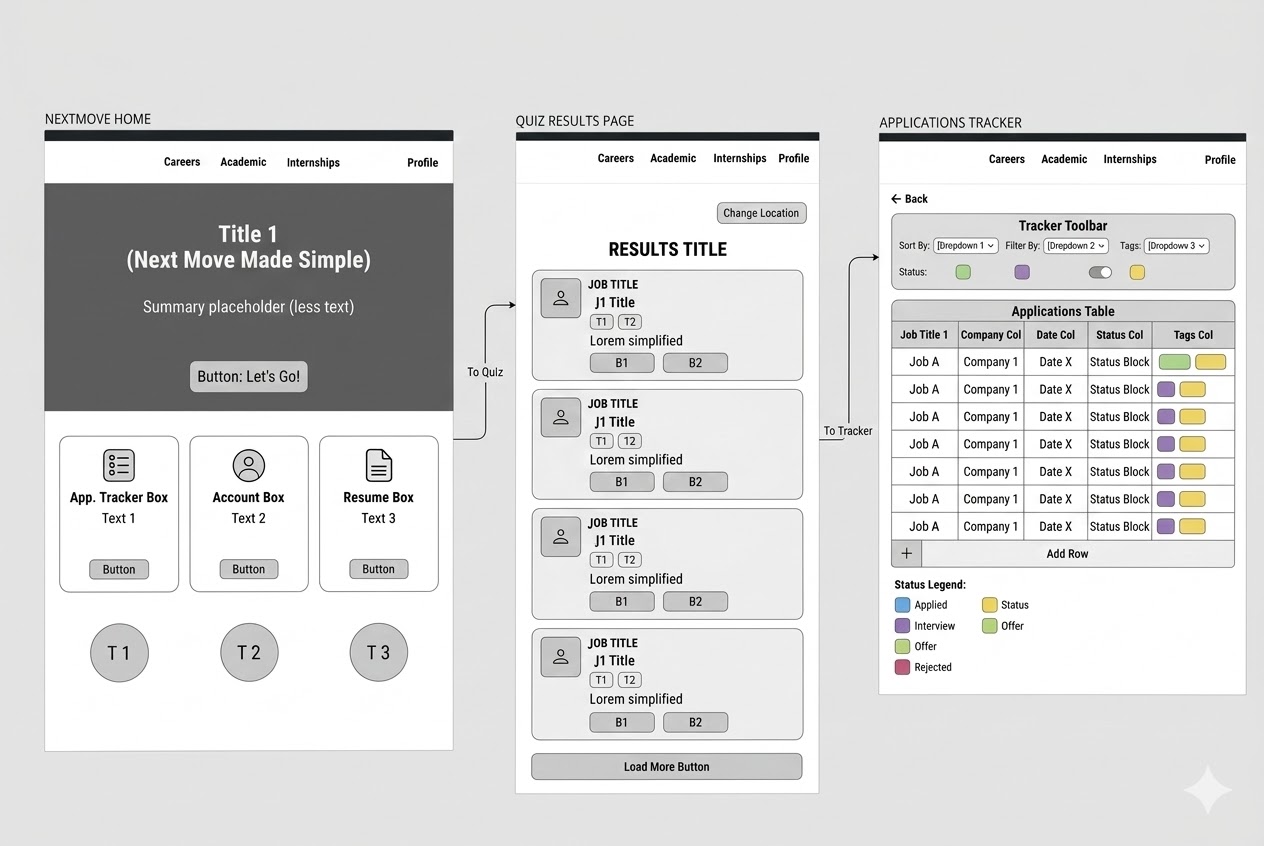
From Wireframes to High-Fidelity

I started with low-fidelity wireframes to test core flows and navigation patterns, then iterated based on feedback before moving to high-fidelity designs. The focus was on creating a clean, scannable interface that doesn't add to students' cognitive load.

NextMove low-fidelity wireframes

Key Screens

Dashboard

Personalized home showing upcoming deadlines, application status overview, and recommended next actions based on user goals.

Discover

Unified search and filtering for jobs, internships, and graduate programs with saved searches and recommendations.

Track

Application tracker with Kanban-style status columns (Saved, Applied, Interviewing, Offer, Rejected) and deadline management.

Quiz

Guided questionnaire helping students reflect on interests, skills, and goals to surface relevant pathways.

Interactive Figma prototype of NextMove

Validating the Solution

Usability Testing

I conducted moderated usability testing with 8 graduating students (mix of juniors and seniors) to validate core flows and identify friction points. Participants completed key tasks: taking the guided quiz, searching for opportunities, adding an application to the tracker, and checking their dashboard.

8 Test Participants
92% Task Success Rate
4.6/5 Ease of Use Rating

Key Findings & Iterations

✓ What Worked

Unified experience: 100% of participants loved having everything in one place. "This is exactly what I needed" was the most common feedback.

Guided quiz: The quiz helped users who felt overwhelmed. 7/8 participants said it gave them clarity on where to focus.

Visual progress: The dashboard's deadline view and application status gave students confidence they weren't missing anything.

⚡ What Needed Work

Quiz length: Initial version had 15 questions—users found it too long. Reduced to 8 focused questions in iteration.

Filter complexity: Discovery page had too many filter options. Simplified to 3 key filters (type, location, deadline) with advanced options hidden.

Mobile nav: Bottom navigation was hard to reach on larger phones. Moved to top navigation with hamburger menu.